
Repeat the ESP32-S3 OLED setup
On this page
Use this guide to repeat the owner's 12 October 2026 setup. It covers one
YD-ESP32-23 v1.3 board with an ESP32-S3-N16R8 module and one 1.3-inch SH1106
OLED at I²C address 0x3C. The owner passed USB and Wi-Fi acceptance with this
kit. Your results are new evidence; do not assume your board will pass.
Use the released ESP32 SDK v0.2.0-alpha.12 and gateway v0.1.0-alpha.10. Firmware binaries are not published. Build the firmware from source.
Before you start: get the code
You need a Mac or Linux computer with Git, Python 3.11 or later and uv. Clone both repositories at the release tags and install their tools once. Git reports a "detached HEAD" for a tag; that is expected.
git clone --branch v0.2.0-alpha.12 https://github.com/adidshaft/grok-gadgets-esp32-sdk.git
cd grok-gadgets-esp32-sdk
python3 -m venv .venv
.venv/bin/pip install -r requirements.lock
.venv/bin/pio pkg install
cd ..
git clone --branch v0.1.0-alpha.10 https://github.com/adidshaft/grok-gadgets-gateway.git
cd grok-gadgets-gateway
uv sync --locked
uv run grok-gadgets-gateway --version
The last command prints grok-gadgets-gateway 0.1.0a10. The first PlatformIO run
downloads the ESP32 toolchain, which takes several minutes.
1. Check the parts
- Check that the board says
YD-ESP32-23andv1.3. Check the module markingESP32-S3-N16R8. - Check that the OLED says
RG1.30 IIC V2.2and hasVCC,GND,SCKandSDApads. This guide uses the SH1106 controller. - Use a USB-C data cable for flashing and provisioning. Use the board's native USB port, not COM. Use a 2.4 GHz Wi-Fi network for the wireless run.
Disconnect USB power before you move a wire. Use a secure connection. The delivered boards had no fitted pin headers; loose jumpers caused resets during the owner's first attempt. The passing test used jumpers directly on the pins.
| OLED pad | Board pad |
|---|---|
VCC |
3V3 |
GND |
GND |
SCK |
GPIO9 |
SDA |
GPIO8 |
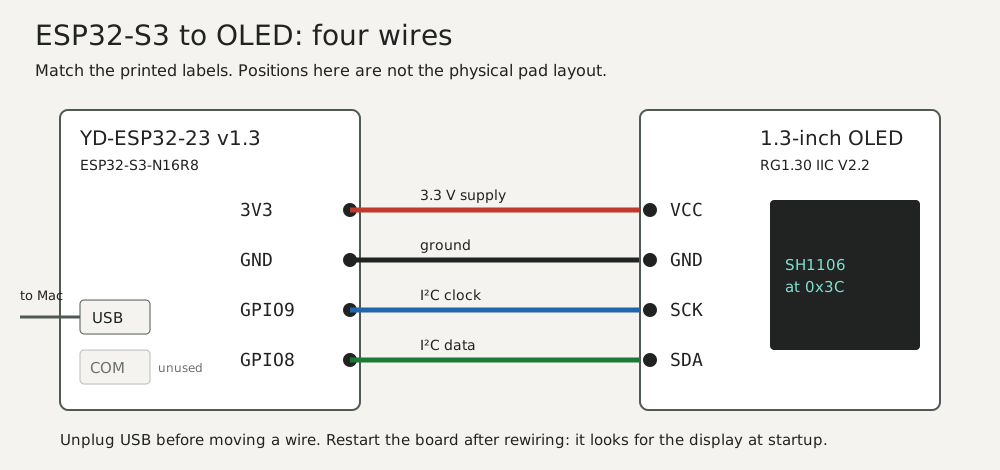
The onboard RGB light uses GPIO48. The BOOT button uses GPIO0. Check printed pad labels; do not infer pin position from a photo or wire color.
2. Flash and check USB
In the ESP32 SDK checkout, build and flash the Wi-Fi build. Use
esp32s3-oled-kit instead for a USB-only run.
.venv/bin/pio run -e esp32s3-oled-kit-wifi
.venv/bin/pio run -e esp32s3-oled-kit-wifi -t upload
For the first flash, hold BOOT while you connect the cable to USB, then release it. See the kit's README for the commands and status messages. Restart the board after you change any display wire. The firmware checks for the OLED at startup.
For a USB run, start the gateway and its USB bridge by following the
gateway kit guide.
Check a short display.text command, display.clear, the RGB light, a BOOT
press and recovery after unplugging and reconnecting. Record the command reply
and what you saw on the board as separate results. A reply does not prove a
physical effect.
3. Provision and check Wi-Fi
For Wi-Fi, use the ESP32 SDK's esp32s3-oled-kit-wifi build. In the gateway
checkout, follow the Wi-Fi devices guide.
Use the Mac's mDNS name, so the setup keeps working when the Mac's address changes. On
macOS, scutil --get LocalHostName prints the name; add .local, in lower case. The
steps below write it as my-mac.local. You can use the Mac's IPv4 address instead, but
then a new address means a new certificate and provisioning the board again.
- Run
uv run grok-gadgets-gateway initanduv run grok-gadgets-gateway lan-cert my-mac.local. - Run
uv run grok-gadgets-gateway enroll DEVICEonce. Use the same device ID that the board reports:oledkit-and the board's MAC address in lower case without colons. The flash log prints the MAC. The serial console also replies to{"type":"status"}with the device ID. - Stop the USB bridge. Run
uv run grok-gadgets-gateway wifi-provision PORT --device DEVICE --lan my-mac.localwhile the board is on the USB data cable. Type the Wi-Fi name and password at the local prompts. Do not paste them into a public issue or log. - Start
uv run grok-gadgets-gateway serve --lan-listen my-mac.local. Move the board to a USB charger. Wait for Online on the OLED. - Send a short text command and clear it. Press and release BOOT. Turn the router off and on, then check that the board returns to Online. Restart the gateway and check it again.
- Keep it running: stop
serve(Ctrl-C), then runuv run grok-gadgets-gateway service install --lan-listen my-mac.local. The gateway now starts at every login, with no terminal. See Keep the gateway running.
The board uses a pinned local CA certificate and a device token. It stores the Wi-Fi password and token in flash without encryption. If the board is lost, revoke its token and change the Wi-Fi password. Do not forward the LAN listener port on your router or put it behind a tunnel.
Holding BOOT for 10 seconds erases the board's Wi-Fi settings. The display counts down after 3 seconds. Release BOOT before zero to keep the settings.
4. Optional: ask Grok Bot
With the gateway running, ask Grok Bot in its desktop app to run
uv run grok-gadgets-gateway rehearse in the gateway checkout on your Mac. This uses
Execution on Local Computer. Approve the command when Grok Bot asks. Set that
permission to ask every time, not always allow; the owner's setting was Always
allow, so no approval card appeared. Check the gateway request log and the OLED.
Native Grok Bot MCP tool calls are not verified. See the
hosting FAQ.
5. Record the result
Copy this table into a new GitHub issue. Remove private addresses, Wi-Fi names, tokens, passwords, serial numbers and household details before posting.
| Item | Your result |
|---|---|
| Board and OLED markings | |
| ESP32 SDK and gateway release tags | |
| Firmware build and SHA-256 | |
| Host OS and connection type | |
| OLED text and clear: reply / observation | |
| RGB and BOOT: reply / observation | |
| USB disconnect and recovery | |
| Wi-Fi online and recovery, if tested | |
| Failed or skipped checks |
The owner's USB record and Wi-Fi record show the evidence level to use. Grok Bot ran an approved local command in the owner's setup; native MCP tool calls remain unverified.
Troubleshooting
These come from the owner's USB and Wi-Fi tests on 12 October 2026.
| What you see | Try this |
|---|---|
No /dev/cu.usbmodem* port, or the first flash fails |
Use a data cable on the USB port. Hold BOOT while you plug in, then flash. After the kit firmware is on the board, later flashes reset it without buttons. |
| Flash says the port is busy | Stop usb-bridge first. The port name changes when you use another Mac port; run ls /dev/cu.usbmodem* again. |
| The board resets again and again | Loose jumpers on the breadboard caused this. Put the jumpers directly on the pins, or solder headers. |
| Blank OLED | Check the four wires against the table, then restart the board. The firmware looks for the display only at startup. |
| A lit column at the right edge | The firmware was built for an SSD1306. This display is an SH1106; use the default build. |
| Not provisioned | The board has no Wi-Fi settings, or BOOT was held for 10 seconds. Run wifi-provision again. |
| WiFi... stays on | The board is still trying to join. Within about 20 seconds the top row shows a reason. |
| No network / 2.4GHz? Name? | The board cannot see the network. Use a 2.4 GHz network; the ESP32-S3 has no 5 GHz radio. Type the Wi-Fi name exactly, including upper and lower case, and run wifi-provision again. |
| Wrong password / Check password | The network refused the password. Run wifi-provision again with the right password. |
| Join timeout / Check router | The network did not answer. Check that the router is on and the board is in range. |
wifi-provision says "The device did not answer" |
Use the Wi-Fi build on the USB port and stop usb-bridge. With v0.2.0-alpha.10 or later, a provisioning line no longer restarts the board. |
| Gateway name? | The board cannot find the Mac by name. Check that the Mac is on, awake and on the same network. Some guest or mesh networks block mDNS; then provision with the Mac's IPv4 address. |
| Gateway... for a minute after the Mac restarts | The gateway service is still starting. Wait; the board connects without help. uv run grok-gadgets-gateway service status shows whether it runs. |
| Gateway... stays on | Wi-Fi works, but the gateway does not answer. Check that the gateway runs: uv run grok-gadgets-gateway service status, or serve --lan-listen in a terminal. If you provisioned an IPv4 address and the Mac's address changed, run lan-cert for the new address and provision the board again, or switch to the Mac's .local name. |
| TLS rejected | The board does not trust the gateway's certificate. Use the certificate from the same init, or provision the board again with the current CA. |
| Token rejected | The device token was revoked or rotated. Run enroll DEVICE --rotate, then wifi-provision again. |
| Grok Bot ran a command without asking | Its local execution permission is set to always allow. Change it to ask every time. |