Made by @adidshaft ↗

Grok Bot is made by SpaceXSI.
Grok Gadgets is an independent project.

↗

Your Grok Bot.
In the real world.

Show text, set a light and read a button on a small Wi-Fi board you build.

Start building

Explore Grok Gadgets

Explore the illustrated connections and try the local light simulation.

Gateway

A conceptual route to the virtual light. No Grok Bot connection.

Explore the architecture
Try the virtual light
TRY IT

LED off · 0 button events · connected

Customize the virtual light ↗

Interactive illustration · simulated devices

Customize the virtual light

NO HARDWARE REQUIRED

Make the virtual light yours.

Change its color, press its simulated button, or disconnect it to inspect offline behavior. Nothing here calls Grok Bot.

Go to the light controls ↑
Customize your virtual device ↗

Settings define the starting state. Reconnecting restores it.

See commands & state +

Ready · browser simulation

Latest report

No command yet.

Virtual device state

ON YOUR COMPUTER

Your own simulator.

Open source. Inspect it, install it, run it locally. Cloud commands use the cloud computer. Approved local execution can use your Mac. See the three connection paths.

Local MCP. No hardware. No API key in the file. Native Grok use is unverified.

Alpha 0.1.0a10 · build 79ad881b · source tests + installed MCP checks passed

Above: browser simulation, with no Grok Bot calls. Kit: real MCP software with a simulated device. A gadget button does not wake Grok Bot. The owner's separate OLED kit passed USB and Wi-Fi tests. Native MCP and mobile checks remain open.

OWNER-TESTED HARDWARE

One board. One display.

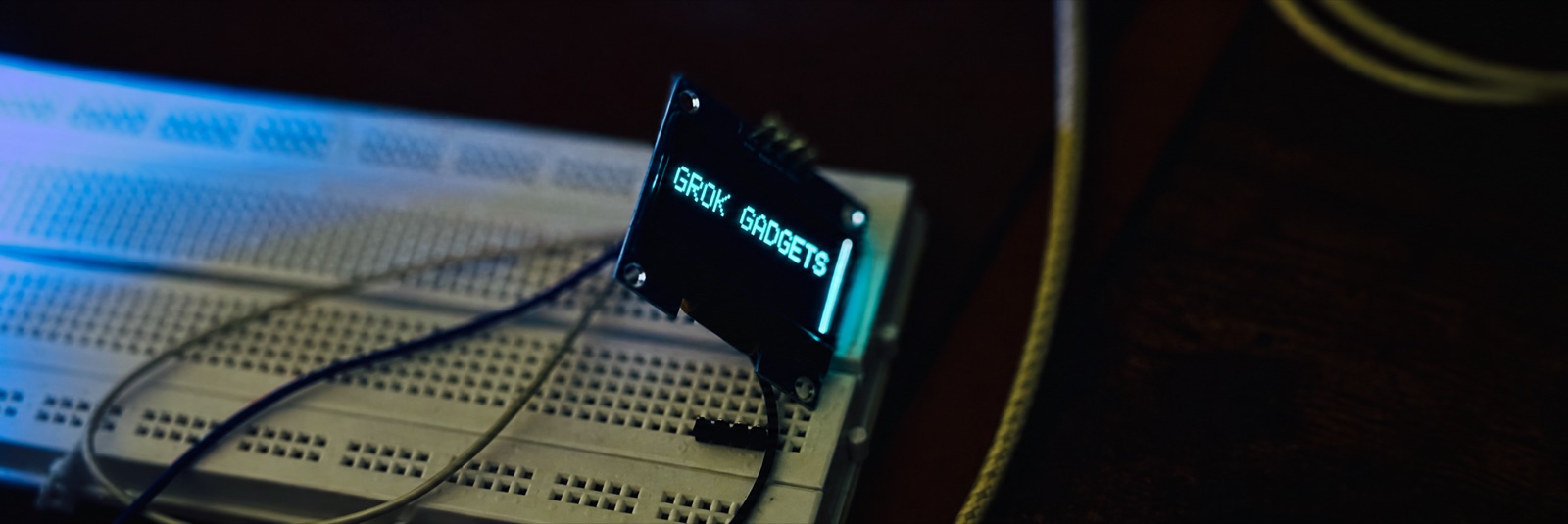
Owner-tested ESP32-S3 board and OLED display connected by jumper wires
Owner-tested kit · display lettering enhanced for readability

Build the kit ↗ · Share your result ↗

NO HARDWARE NEEDED

Try the tools in five minutes.

Install the gateway and run a simulated light on Mac or Linux.

python3 -m venv .venv
.venv/bin/python -m pip install grok-gadgets-gateway==0.1.0a10

Follow the five-minute guide ↗ · How we verify ↗

CHOOSE YOUR FIRST PATH

Start building.

01

Tested OLED kit

Build the ESP32-S3 Wi-Fi board and show text on its display.

Repeat the kit ↗

Already use Home Assistant? Explore the integration ↗ · All components ↗